What on Earth am I thinking? I'm going to boot Mac OS 10X, Debian, and Darwin on a single machine. Why? BECAUSE I CAN, DAMMIT!
So far I've gotten OSX and Debian running smoothly, but my installation of Darwin seems to be a little borked. In addition, to install the necessary network drivers for Debian, I need to reinstall it from a mini .iso because the download repositories are pointed at the cd and not the server. Fun stuff. As far as Darwin goes, I'm basically clueless, so I need to do a lot of research. Do I need to just reinstall it? Will Darwin work with Yaboot? Am I asking the right questions?
It's all in the learning curve, I suppose, but I shouldn't have leaped right into triple booting when I haven't even done any dual booting. Oh well. The more you know, right?
I'll post updates when I make a good amount of progress, so be sure to check for them at the usual place. Eventually I'll get around to making a solid guide with links and stuff, but that's for later.
Saturday, August 29, 2015

New Blog Title and Short Update
I may be changing the name a bunch over the next few days, so keep an eye out for that. I will not change the URL though, so if that's how you find me, then it'll still work.
I have received the parts for the Mac Classic project, and I'm going to start assembling it soon.
School started last Monday for me, so I may not have a ton of time for the next month or so. Nothing I can do about that.
I have received the parts for the Mac Classic project, and I'm going to start assembling it soon.
School started last Monday for me, so I may not have a ton of time for the next month or so. Nothing I can do about that.
Wednesday, August 19, 2015
PS Vita Review
Hey! I'm back. Sorry for the longer than expected absence. We were moving and getting the new and old houses ready for the move, cleaning out the new house, and blah blah blah boring stuff. BUT, That's not why I'm here. Today I'm here to write a review about the Sony PS Vita. Well, I have lots to say, but nowhere to begin. Sooooooo... STATS (these apply to the WIFI model, 'cause that's what I've got):
>CPU: ARM A9 core, 4 cores. Unknown clock speed.
>GPU: SGX543MP4+ <<< I don't even know. Hopefully something good.
>Physical Dimensions: W= 7.2 inches, H=3.3 inches. Curvy and stuff
>Display: LCD, 16:9 aspect ratio, 5-inch, 960x544 resolution, capacitive multi-touch. Also has a capacitive multi-touch pad on the back, akin to the laptop kind.
>Hard Drive: Flash, 1 GB on-board, expandable.
>Cameras: I honestly don't even care.
>Sounds: Stereo speakers, built in mic, Bluetooth 2.1+EDR compatible.
>Sensors: Six-Axis motion sensing system (3-axis of each; gyroscope, accelerometer), and a 3-axis electronic compass
>Weight: not heavy enough to matter.
>Controller buttons: the PlayStation ones, minus L2/3, and R2/3. If you don't know these; shame on you. Also has volume up/down, and power button.
>Wifi: the working kind. Works with 802.11b/g/n
>Ports: Saddeningly few. PS Vita card slot, proprietary memory card slot, Micro USB port, 3.5mm headphone jack.
>Nothing else, really.
So with that out of the way, I guess we'll head on over to the user experience.
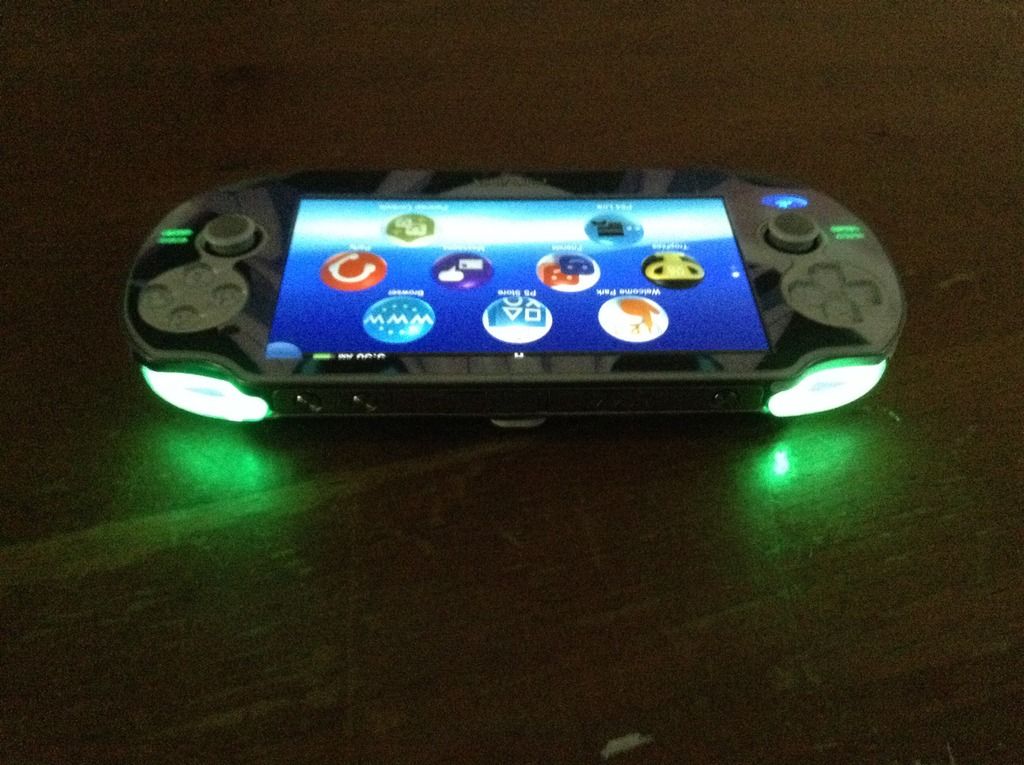
The UI is a very novel one, what with the... peculiar arrangement of icons and all. There's a row of three, then of four, then of three again.
 This is, in my opinion, a suboptimal use of screen space. In addition, the icons drift around the screen, and they feel too 'floaty'. It's not very noticeable until you think about it, but it is there. This has a weird, distracting effect when you stare at the screen, thinking about what game to play. Fortunately, if you use it a lot, you'll only have to look at once and a while. There's also that goofy notification bubble that, while it fits the 'theme' is very bleh. With the negative out of the way, I like the little black ribbon at the top. More specifically, I like the fact that it lists the current running apps. You'll notice the Sony and PS Vita logos on the bezel, and for some reason I'm drawn to those. The clear D-pad, PS Button, start, select, x, square, triangle, and circle are pretty nice. They have a good response and a small 'click' range. The top buttons are kind of cool, being that they're kind of hinged and you can press them from the right end or left end of the button, but if you want to press the middle, it doesn't work as well. A cool feature that could easily make this product more expensive is by putting lights on the buttons, but that isn't an official thing, unfortunately.
 The analog sticks are good, nothing special, but good nonetheless. I found the volume controls are a little too fine-grained, and there's no mute button, even a software one. You have to hold volume down until it's muted. This bothers me. The built in speakers are mediocre at best, but seem to even out and get less grainy as they get louder. For some reason, playing sound through the headphones is way better, so that's what I do. The screen itself has weird problems, and I haven't researched them to see if it's just me*. Every once and a while the screen will continue registering a press even when I'm not. The back track-pad doesn't have this problem, though. Speaking of the track-pad, it gets scratched fairly easily, so watch out.
Back into softwarez, the free selection is incredibly limited in the store, and the library itself isn't very large. If you're at all like me and bought CD's for all of your PS3 Games, then you're SOL. You'll have to buy them all again, and some don't have PS Vita versions. I tried the game streaming thing for a grand total of 5 minutes, and, while nice, the remapped controls for R2/R3 and L2/L3 are still only a touchpad. It was really easy to set up, unlike trying to find a goddam Nvidia Shield, which is what I got this instead of.
The memory is annoying, to say the least. It's entirely proprietary and entirely too expensive. $70 for 16 GB is inexcusable. At least use SD cards or something. And as far as 'hacks' and 'mods', go buy a PSP, because they basically don't exist.
All in all, It works good enough to replace the iPhone 4 that I was using as an iPod, so that's pretty nice. And frankly, all I wanted was to split my phone and my portable entertainment into two devices, and it did that very well. While I didn't touch on any of the preinstalled apps, they were all pleasing to use, and the battery life was pretty much as advertised for me. If you are looking for a casual device to play crappy games on, look elsewhere because this device is a PS3 in a smaller form factor, so expect to drop some cash on memory and games, because that's what it's for. It was made so you can sit down on your bed, or in the airport and play good games while you wait for a little while. You have to have more than 5 minutes to play a game if you want to use this, because it is just a PS3 in disguise.
*I have sweaty hands occasionally.
>CPU: ARM A9 core, 4 cores. Unknown clock speed.
>GPU: SGX543MP4+ <<< I don't even know. Hopefully something good.
>Physical Dimensions: W= 7.2 inches, H=3.3 inches. Curvy and stuff
>Display: LCD, 16:9 aspect ratio, 5-inch, 960x544 resolution, capacitive multi-touch. Also has a capacitive multi-touch pad on the back, akin to the laptop kind.
>Hard Drive: Flash, 1 GB on-board, expandable.
>Cameras: I honestly don't even care.
>Sounds: Stereo speakers, built in mic, Bluetooth 2.1+EDR compatible.
>Sensors: Six-Axis motion sensing system (3-axis of each; gyroscope, accelerometer), and a 3-axis electronic compass
>Weight: not heavy enough to matter.
>Controller buttons: the PlayStation ones, minus L2/3, and R2/3. If you don't know these; shame on you. Also has volume up/down, and power button.
>Wifi: the working kind. Works with 802.11b/g/n
>Ports: Saddeningly few. PS Vita card slot, proprietary memory card slot, Micro USB port, 3.5mm headphone jack.
>Nothing else, really.
So with that out of the way, I guess we'll head on over to the user experience.
The UI is a very novel one, what with the... peculiar arrangement of icons and all. There's a row of three, then of four, then of three again.

Back into softwarez, the free selection is incredibly limited in the store, and the library itself isn't very large. If you're at all like me and bought CD's for all of your PS3 Games, then you're SOL. You'll have to buy them all again, and some don't have PS Vita versions. I tried the game streaming thing for a grand total of 5 minutes, and, while nice, the remapped controls for R2/R3 and L2/L3 are still only a touchpad. It was really easy to set up, unlike trying to find a goddam Nvidia Shield, which is what I got this instead of.
The memory is annoying, to say the least. It's entirely proprietary and entirely too expensive. $70 for 16 GB is inexcusable. At least use SD cards or something. And as far as 'hacks' and 'mods', go buy a PSP, because they basically don't exist.
All in all, It works good enough to replace the iPhone 4 that I was using as an iPod, so that's pretty nice. And frankly, all I wanted was to split my phone and my portable entertainment into two devices, and it did that very well. While I didn't touch on any of the preinstalled apps, they were all pleasing to use, and the battery life was pretty much as advertised for me. If you are looking for a casual device to play crappy games on, look elsewhere because this device is a PS3 in a smaller form factor, so expect to drop some cash on memory and games, because that's what it's for. It was made so you can sit down on your bed, or in the airport and play good games while you wait for a little while. You have to have more than 5 minutes to play a game if you want to use this, because it is just a PS3 in disguise.
*I have sweaty hands occasionally.
Sunday, July 5, 2015

Thursday, June 25, 2015
Not dead, just 'resting'.
First off, I'd like to apologize to all of my (few) followers for the lack of posts. This has been mostly due to life and stuff, but also due to not having much to post about. First point, I just took my driving practical today and passed, which was a huge relief. My dad was giving me crap the entire training period, so that sucked. Second point, We're moving! I'm not going to say where because I'm a bit paranoid, but it is the internet we're talking about. Last week we went and picked out a house, etc. Third point, I have acquired a PS Vita. I'm sure a whole lot of people hate these, but they're really stellar devices. I'm probably going to write a review on mine, so keep a sharp eye out for that later, probably early July (no promises). I'm making headway on my Classic Mac conversion, going to have to set up a page with links and stuff. I haven't ordered anything, but I have most of the parts picked out and I'm working on how the battery power is going to work. Other than that, not a whole lot has happened.
Sunday, May 31, 2015
Huge Props
So I was fuddling around the internet, looking for customizations for my Powerbook, and I happened across OnyX. This is a pretty nifty tool that you ought to check out if you own a Mac at all. I ordinarily wouldn't have mentioned them except for their website. It's pretty '2014 generic', but it loaded really fast, which is not at all normal for websites of this style. It also had every single download for Mac OSX, from 10.1 through 10.10, on the main download page. This is really awesome, and I would totally recommend heading over there to check them out.
>>Here<<
>>Here<<
Friday, May 22, 2015
New Smaller Project...
I'm going to do a little research today on connecting my PS3 Dualshock controller to my PowerBook. Seems like a good idea, and it would make playing Wolfenstein 3D a little more bearable (Trackpad gaming sucks). I'll update this post when I do a little work on it.
==Update==
I remember when I tried this last year...the shady drivers, broken links and angry Mac-and-windows forum users. Dark times, these are. Dark Times.
==Update==
I remember when I tried this last year...the shady drivers, broken links and angry Mac-and-windows forum users. Dark times, these are. Dark Times.
Thursday, May 21, 2015
Honoring the Majority
I'll often forget in my long binges on internet blogs that the United States is not the only country on the internet. So here's to all the other internetted nations out there. (And preemptive apologies for any bias or rude language that may appear here, I am only human, after all.)
Thursday, May 14, 2015
'New' Gear
When I say I get something new, I really mean that I've acquired or upgraded something old. I recently put a new Transcend 120 GB IDE/ATA Solid State Drive and a new 1 GB DDR SDRAM stick in my trusty powerbook. I must say, it's great. Boot times are way faster, and the extra 512 MB helps a ton. That being said, I've got to reconfigure all of my crap because I forgot to burn a backup disc while the old HDD was still in place. I am not taking it apart and putting it back together just for some crappy games, so I'll look for them later (I think I got most of them from Macintosh Garden anyway). The main thing I hate reinstalling is Tigerbrew. It's a great piece of software, but man is it a pain to reinstall. You've got to get Xcode, and for that you've got to get an Apple ID and a developer account (both are free). But you can't get any Xcode, you've got to use Xcode 2.5 (on Tiger anyway, idk about Leopard), and that's a pain to find. But once it's installed, all you have to do is install gcc and sometimes cmake and you're good to go. Other than you have to update it every time you go into the terminal, but hey, that's super easy with a 'brew update' and 'brew upgrade'. So that's what I'll be working on (again) this weekend.
PS: For whatever reason, my Airport Express card cannot connect to my wifi, so I have to do an Ethernet connection for the first system updates.
PS: For whatever reason, my Airport Express card cannot connect to my wifi, so I have to do an Ethernet connection for the first system updates.
Wednesday, May 6, 2015
Coding on a TI
I found this nifty little tool hidden deep within my math class. The TI84 has a pretty big coding community surrounding it, mostly for games, but for other esoteric stuff as well like mp3 players and even a camera or web browser. There's a site that contains a lot of this stuff, it's pretty neat. I often use my TI for Tetris and minesweeper, but there's a keyboard available that I'd like to get to improve coding speeds and take notes with. Another hopeful project is I would like to get a hold on a couple (thousand) ESP8266's to possibly make the Calc access the internet, but that's for a much later date.
Nvidia Shield
Nvidia's Shield Portable has been mysteriously absent from the shelves of stores lately. I have found a few on eBay for $700 (!). I did a little research, and saw that Nvidia has filed some wireless certifications, so maybe (hopefully) they'll release a new one for sale this year.
source:
wccftech.com/nvidias-shield-2-lives-zauba-spotting/
source:
wccftech.com/nvidias-shield-2-lives-zauba-spotting/
Tuesday, May 5, 2015
VPN, VNC, or Remote Desktop?
I have been trying for the last few days to get all three of these running, but to no avail. My desktop has an unformatted, 1 tb HDD inside that I wanted to be able to access through my Powerbook G4 at school (for nefarious purposes muahahahah). I did my research and came up with the incorrect conclusion that a VPN would be best for me. I set it up, tried it at home, and it didn't work. I left it alone and tried at school, where it unsurprisingly didn't work. When I got home, I put the project on hold because I had a very large assignment due the next day, and didn't get around to actually researching the project until the next month, which gives you a great gauge of the speed of my projects. Anyway, the next time I pulled up some VPN info, I read that it just routes web traffic through my desktop. It isn't a way to access my files, which is what I actually wanted. One download later, I had the Microsoft Remote Desktop Connection client for Mac. Which didn't work, because mediafire sucks. I promptly acquired a legitimate version for OSX 10.4.11, and got to work. Using the Fing network scanner app, (free on iOS, idk about android) I looked up the IP for my desktop. It was missing. As it turns out, having the PC on in the first place helps a lot, as does enabling remote desktop from settings. After I had done these things, I was able to get right down to the simple buisness of crashing the client by opening up Floating Point on max graphics at millions of colors. 10/10 would test this way again. I reopened the RDC, this time rendering my desktop in 256 colors at minimum graphics, and not opening any games up like a true genius. It now works flawlessly on my 1.5 gHz Powerbook, I can't wait to try other games this weekend. I'll be trying all of the games in my steam library, except for Postal 2.
Sidenote, I may be getting a new SSD and RAM for the powerbook, so I'll post on that when it happens.
Sidenote, I may be getting a new SSD and RAM for the powerbook, so I'll post on that when it happens.
Thursday, April 30, 2015
Newgrounds
If you've never been to Newgrounds, shame on you. SHAME. It's an amazing site for discovering artists (of multiple kinds), but has been kind of overshadowed by a combination of youtube, soundcloud, and deviant art.
>http://www.newgounds.com
If youre unsure where to start, EnV is a good electronic artist, highly recommended.
>http://www.newgounds.com
If youre unsure where to start, EnV is a good electronic artist, highly recommended.
Monday, April 20, 2015
Those Bastards
It is no longer possible to view YouTube on iOS 5 without going through a browser. The default YouTube app broke long ago, and the one available in the app store broke this week. PLZ SEND HELP.
If anyone knows of a YouTube app substitute that works for iOS 5.1.1 or below, please let me know. iPad, first generation iOS 5.1.1 jailbroken.
If anyone knows of a YouTube app substitute that works for iOS 5.1.1 or below, please let me know. iPad, first generation iOS 5.1.1 jailbroken.
Thursday, April 16, 2015
My 'Collection'
Here's a list of all my computers. It may or may not interest you, but here they are, in the order of most used -> least used
1] PowerBook G4 Aluminum, 12' @ 1.5 GHz with 768 MB RAM. Mac OS 10.4.11.
2] Custom built tower, Intel core i5 Quad Core 3rd gen. @ 3.20 GHz with 8 GB of RAM. Windows 7 Professional (?) with Nvidia GTX 750 Ti and 1 TB HDD with extra SSD for the OS.
4] LG530G prepaid phone with Tracfone Wireless.
4] iPad, 1st gen.
5] Raspberry Pi model B with 512 GB RAM.
6] Macintosh Classic with no internals, will eventually be used for the Raspberry Pi.
1] PowerBook G4 Aluminum, 12' @ 1.5 GHz with 768 MB RAM. Mac OS 10.4.11.
2] Custom built tower, Intel core i5 Quad Core 3rd gen. @ 3.20 GHz with 8 GB of RAM. Windows 7 Professional (?) with Nvidia GTX 750 Ti and 1 TB HDD with extra SSD for the OS.
4] LG530G prepaid phone with Tracfone Wireless.
4] iPad, 1st gen.
5] Raspberry Pi model B with 512 GB RAM.
6] Macintosh Classic with no internals, will eventually be used for the Raspberry Pi.
It's a Brave New World...
*pushes power button*
*loud screeching noises*
"Is this thing on?"
Ayyee! This is my new blog, it'll probably be mostly links and a dump of my thoughts and opinions. It may get really angry and biased, but I'll try to keep that out. Hopefully nobody brings it in though...
*loud screeching noises*
"Is this thing on?"
Ayyee! This is my new blog, it'll probably be mostly links and a dump of my thoughts and opinions. It may get really angry and biased, but I'll try to keep that out. Hopefully nobody brings it in though...
Subscribe to:
Posts (Atom)